theodoruszq@QiangNAS:~/.vscode-server$ ./code-17baf841131aa23349f217ca7c570c76ee87b957
[2025-04-24 23:02:40] error This machine does not meet Visual Studio Code Server's prerequisites, expected either...
  - find /lib/ld-musl-x86_64.so.1, which is required to run the Visual Studio Code Server in musl environments
Recently, I realized just how many books I had downloaded or read. I had tried organizing them into folders before, but the result was a mess. Finding a book I had read, or remembering what I thought of it, took far too much effort. I had also been using GPT4o a great deal lately, so this seemed like a good opportunity to ask it to help me write a book-management application.
What should the application do? My requirements were simple:
First, it should list all my books and let me search easily by keyword.
It should let me record information, rather than just display a static webpage. I wanted to mark books as “reading,” “finished,” or “not interested,” and give them ratings.
I needed a field for a brief note about each book—even just a sentence.
I should be able to access the site easily on my local network without starting any services on my Mac mini. The NAS should handle all server-side work.
Later, the same system should be easy to adapt for keeping track of films, music, and other media.
Before I started, I should say that I had very little frontend or backend experience. I knew a little SQLite, HTML, and CSS, but I did not understand how modern frontend and backend frameworks worked. I had never completed a full application involving both. This was a real challenge for me.
VSCode Connection Failed
There was an interesting detour along the way. I had previously used VSCode over SSH to connect to my NAS, which made editing code and working with data very convenient. After VSCode v1.99, however, the connection stopped working—even though SSH itself was fine. That seemed bizarre, because VSCode Remote is built on SSH.
Why was this happening? I was puzzled. At work, I used VSCode to connect to remote servers every day. Why could I not connect to my NAS at home? I began looking through the logs and found a problem involving libc.so. I had thought the system used glibc, but the error appeared to ask for a musl version.
theodoruszq@QiangNAS:~/.vscode-server$ ./code-17baf841131aa23349f217ca7c570c76ee87b957
[2025-04-24 23:02:40] error This machine does not meet Visual Studio Code Server's prerequisites, expected either...
  - find /lib/ld-musl-x86_64.so.1, which is required to run the Visual Studio Code Server in musl environments
So I started tinkering. I asked GPT4o directly how to compile a musl version of glibc, and it quickly gave me an answer. Then I ran into another problem: compiling it on the NAS required tools such as cmake and gcc, which meant installing Entware and opkg. I asked GPT4o again and learned about Entware and opkg. Following its instructions, I installed opkg very quickly, and the musl/glibc compilation went smoothly too. I thought all I had left to do was add the shared library to the system, and felt rather pleased with myself.
Of course, something unexpected happened. VSCode's entry point reported “Permission Denied.” Assuming it was a permissions issue, I moved the vscode-server directory around and wondered whether its location lacked execute permissions. After plenty of unsuccessful attempts and back-and-forth questions, GPT4o finally gave me this explanation:
You downloaded a MUSL-compiled VSCode Server and are running it on a glibc system. The kernel rejects execution directly, resulting in “❌ Permission denied,” rather than “Exec format error!”
It then suggested manually downloading the glibc version of vscode-server onto the NAS and reconnecting through VSCode. That did work. However, I also found a workaround on GitHub that simply created a file: touch /tmp/vscode-skip-server-requirements-check. At this point, I no longer wanted to figure out which change had actually fixed it. It worked. That was enough. Ha!
GPT4o Vibe Coding
GPT4o had amazed me repeatedly over the past month, from image generation to everyday conversation. It was incredibly useful. Initially, I had wanted some advice on organizing my files, but it suggested building a software management system. This was my first prompt, after which it recommended FastAPI and React:
Could you write an automatic organization script, with a frontend? I need an easy way to mark which books I have read, which I am reading, my notes, when I started and finished, and how I felt about them. What framework would be suitable?
Out came a pile of code. GPT4o wrote the backend first, using SQLite and FastAPI. It moved fast, and the result seemed to work surprisingly well. I asked for a few revisions through prompts, and those went smoothly too. Most versions ran on the first try, without bugs or errors.
Then came the frontend. I had originally thought I would put everything on the NAS, but that turned out to be a mistake. The NAS could not handle many of React's dependencies, and in any case it only needed the compiled static site. So I worked on my Mac instead, starting from a React TS template and doing almost everything by editing App.tsx. There were a few bumps. At first, the page width was strange, things did not line up, and elements were squeezed together. Eventually, I realized that the generated template's CSS seemed designed for mobile screens. Commenting it all out fixed the problem.
There were a few final details, such as which frontend IP address to use in App.tsx. I thought 127.0.0.1 would work, but it did not; I needed the server's IP address. I also had to enable Synology's Web Station. GPT4o walked me through that step by step.
My overall feeling was that whatever problem came up, I could deal with it as it arrived and ask GPT4o whenever I was unsure. It helped me learn a great deal. It had truly become both a teacher and an everyday assistant.
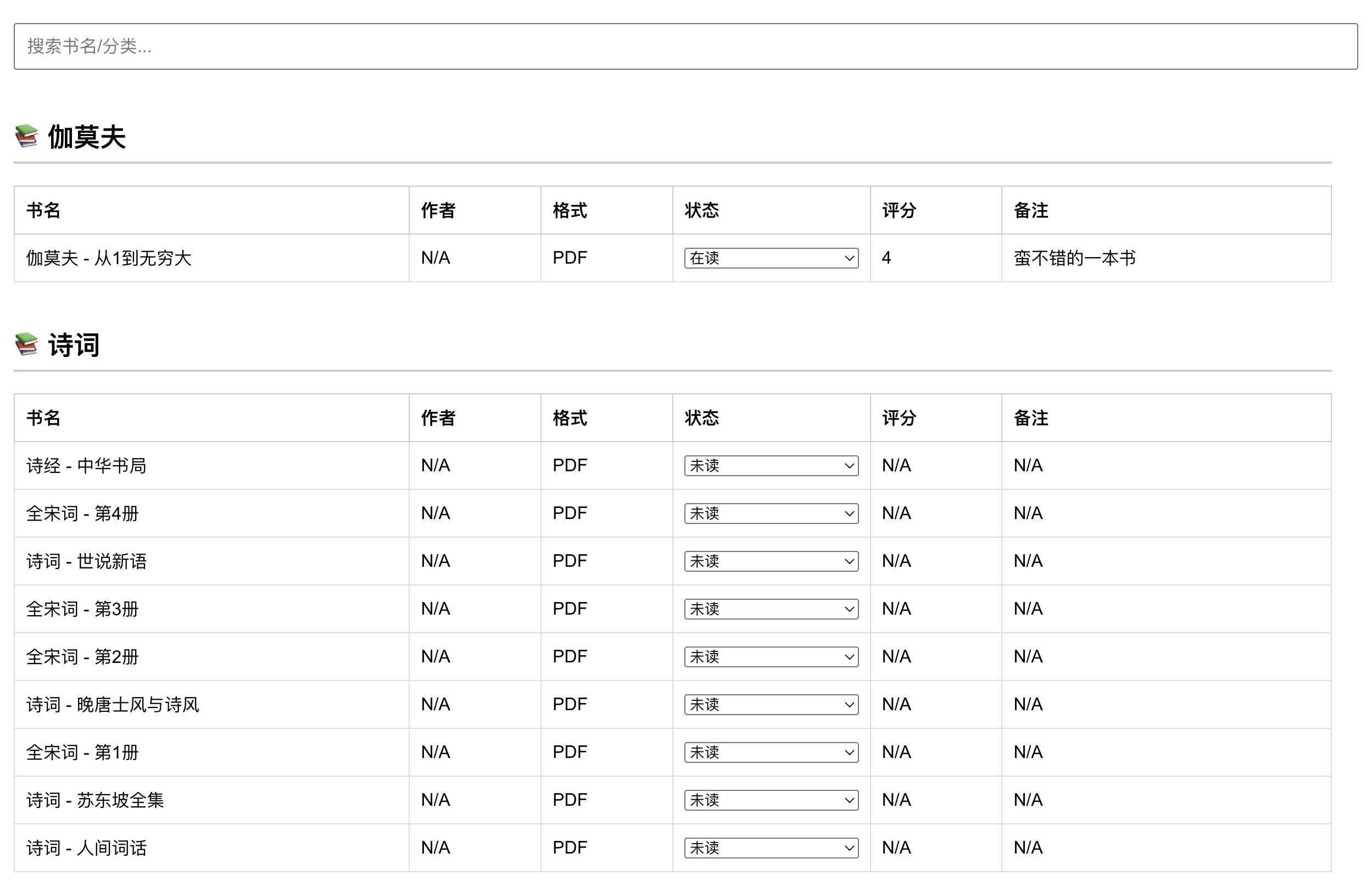
Here is a screenshot of the finished application. Looking at it made me feel wonderfully accomplished.
Of course, the system still has plenty of limitations. It is not particularly attractive. It has no book covers, though those could all be generated with GPT4o. There is no option to sort by rating, and no direct link to open a book. These are all interesting little features to add. The encouraging part is that the whole system can be changed, and its core frontend and backend consist of just two files.
Coda
GPT4o is one of the most worthwhile products I discovered in 2025. Its capabilities have freed up a great deal of my time and mental energy, allowing me to think about problems from a higher level. Despite its hallucinations, it has genuinely taught me a lot: Flow Matching, Euler samplers, DDIM, and more. Its explanations are clear. It also helps me read papers and write Tampermonkey JavaScript. The multiplier effect is enormous. It did not feel this powerful when I used it in 2023 or 2024, but this year it seems to have moved up a level and changed in a more fundamental way.
It has many shortcomings too. It took a full 44 rounds of prompting before I had a version of this system that I was basically happy with. Sometimes it became confused. After all, I was only giving it fragments of information; it could not see my screen or environment. But I work in the industry myself, so I could supply the information it needed. As long as I pointed it in the right direction, it knew how to proceed.
I have also begun to notice how easily GPT4o breaks down the barriers between areas of expertise. I can now learn about the Linux kernel, Docker, or compiler principles with much less difficulty. These were things I either never encountered at university or did not learn properly. Now those barriers seem to be dissolving—even in my own field of computer vision.
I am eager to see what happens next with AI. This is an exciting time: perhaps the best of times, and perhaps the worst.